It is an AI video generator built by fal on top of MiniMax's H3 model and released together with MiniMax. fal retrained it for two things: raw speed, and sticking closely to what you asked for. The result is a 5-second clip in roughly three seconds instead of several minutes. You hand it a photo or a sentence, it hands you back an MP4.
Ranked #1 for image-to-video
MiniMax H3 Max AI Video Generator
Drop in a photo or type one sentence, and get a real video back in about three seconds. H3 Max is the speed-tuned version of MiniMax H3, built by fal — same polished look, a fraction of the wait.
- ~3 sec
- to make a 5-second clip
- 5–15 sec
- you pick the length
- Native audio
- sound built into every clip
Sample Video
Fast is the headline. Quality is the reason it matters.
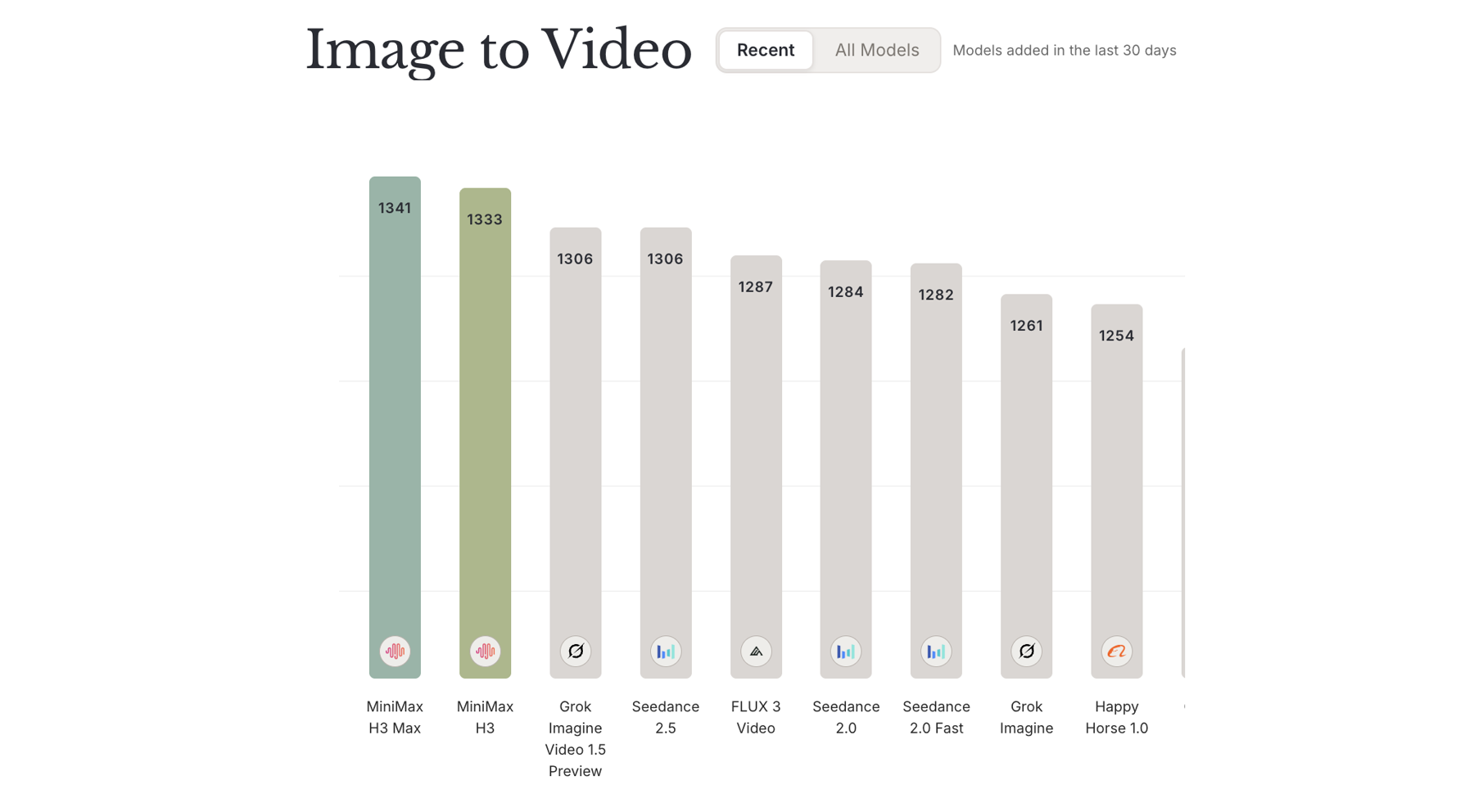
H3 Max sits at the top of the public image-to-video leaderboard, judged by real people voting on side-by-side clips — not by us.
#1
Image-to-video on Design Arena
1341
Elo score, ahead of official H3 at 1333
35×
the output of the official H3 endpoint, per fal's testing
Design Arena
#1 in Image-to-Video
An Elo of 1341 puts H3 Max ahead of the official MiniMax H3, Seedance 2.5 and Gemini Omni Flash.
See the leaderboard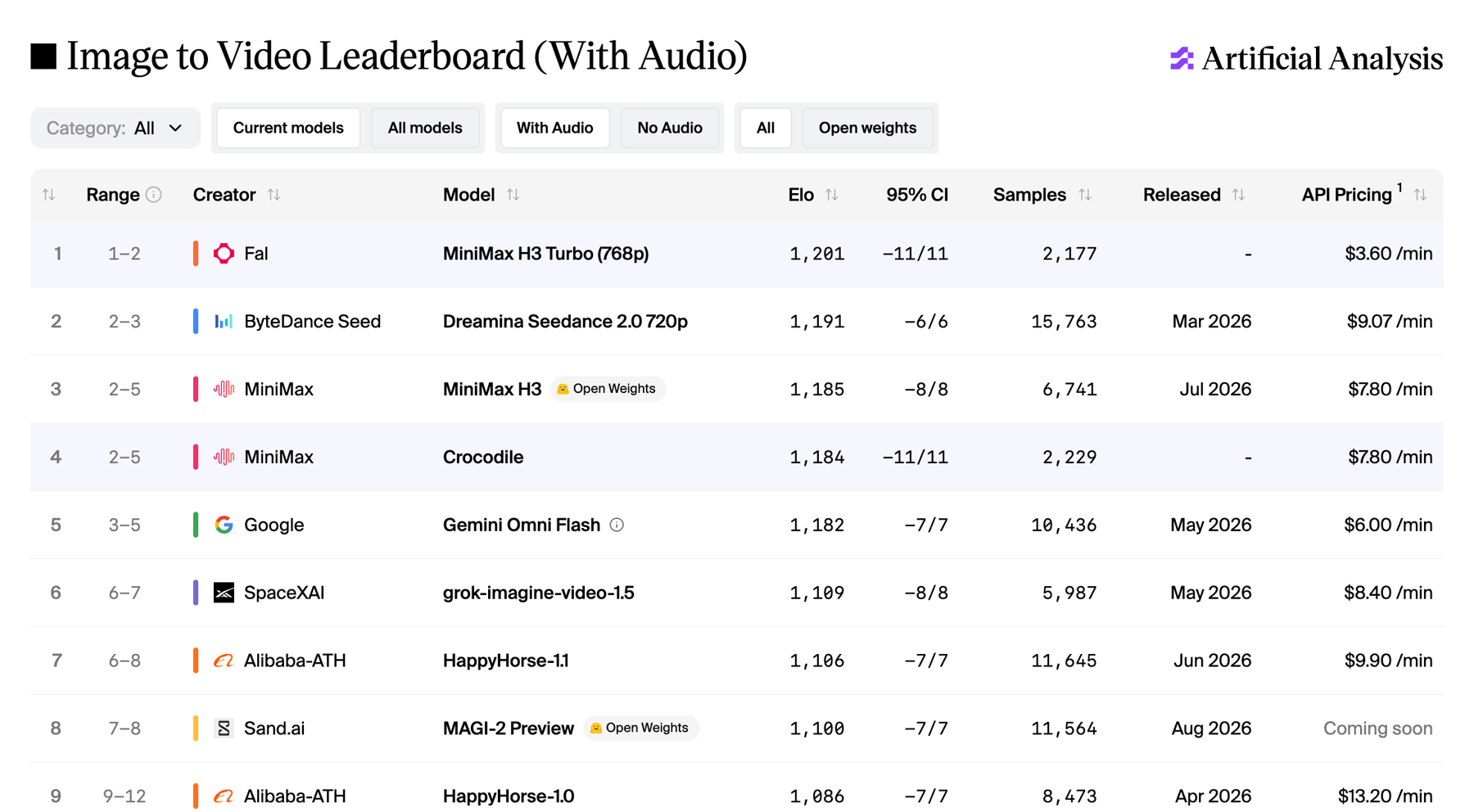
Artificial Analysis
Image-to-Video leaderboard
Independent head-to-head voting, updated as new models arrive. Open it and see where H3 Max lands today.
See the leaderboardBoth boards are public and rankings shift as new models launch, so you never have to take our word for it.
Three steps, about three seconds
No timeline, no keyframes, no editing software. If you can write a text message, you can do this.
- 1
Bring a photo or an idea
Upload an image you want to animate, or just type what you want to see. One or two sentences is plenty — you do not need to sound technical.
- 2
Pick a length and hit generate
Choose anywhere from 5 to 15 seconds, at 480p or 768p, in whatever shape your platform wants. Then press the button and watch it come back almost immediately.
- 3
Download it, or try again
Happy with the result? Download the MP4. Not quite there? Reword one detail and run it again — it is fast enough that experimenting actually feels fun.
What you can actually make
Four things people use H3 Max for every day. All of them are a text box, an upload button and one click.
Image to video
Make a photo move
Give it one image and H3 Max figures out how the scene should move — hair, fabric, water, a gentle camera drift. This is what it is ranked best in the world at.
Text to video
Type a scene, get the scene
Describe the shot in plain language and skip the camera entirely. Useful when you have no footage, no crew and no budget.
Start and end frame
Decide where it starts and ends
Add a second image as the closing frame and H3 Max fills in everything between the two. The simplest way to get the exact ending you had in mind.
9:16, 1:1, 16:9 and more
Fits every feed
Vertical for Reels and TikTok, square for the grid, wide for YouTube. Six shapes plus an Auto setting that just follows the photo you uploaded.
How to write a prompt that works
H3 Max was specifically retrained to follow instructions closely, which means being specific really does pay off. Stack these five pieces and you are most of the way there.
The five-part recipe
- 1. Who or what
a tabby cat
- 2. What it does
leaps onto the windowsill
- 3. How it is filmed
slow push in, low angle
- 4. Where it happens
a sunlit kitchen
- 5. How it is lit
warm morning light, soft shadows
Put together
A tabby cat leaps onto the windowsill, slow push in from a low angle, sunlit kitchen, warm morning light with soft shadows
One habit worth keeping: describe movement, not adjectives. "Walks slowly toward the camera" beats "beautiful, amazing, 8K, masterpiece" every single time.
Or just steal one of these
Product close-up
768p · 5s · 1:1A glass bottle of cold brew coffee on a wet stone counter, condensation sliding down the glass, camera slowly orbiting to the left, moody side lighting, dark background
Portrait that breathes
768p · 5s · 9:16A man in a linen shirt standing on a rooftop at golden hour, wind moving his hair and collar, he glances toward the camera, slow handheld drift upward, warm backlight
Travel establishing shot
768p · 10s · 16:9A narrow cobblestone street in an old coastal town at dusk, string lights swaying above, a few people walking away from the camera, slow forward dolly, soft blue and amber light
H3 Max or MiniMax H3?
Both are in the generator above — the model dropdown switches between them. Here is the honest difference.
Speed
- MiniMax H3 Max
- About 3 seconds for a 5-second clip
- MiniMax H3
- Standard — expect to wait minutes
Sharpness
- MiniMax H3 Max
- 480p or 768p
- MiniMax H3
- 768p or 2K
Length
- MiniMax H3 Max
- 5 to 15 seconds
- MiniMax H3
- 5 to 15 seconds
Copy a reference photo, video or voice
- MiniMax H3 Max
- Not supported
- MiniMax H3
- Supported
Best for
- MiniMax H3 Max
- Trying a lot of ideas quickly
- MiniMax H3
- One final shot, as sharp as possible
The simple rule
Start with H3 Max. It is quick enough to try five versions of an idea in the time the other model needs for one. Move to MiniMax H3 only when you need 2K, or when you want the video to copy a reference you already have.
Questions people ask first
Everything you probably want to know before you spend a single credit.
fal measured a 5-second clip at about three seconds of real time, which works out to roughly 35 times the output of the official MiniMax H3 endpoint. In everyday use, expect a few seconds for short clips and a little longer for 15-second 768p ones. Busy periods can add some queue time.
H3 Max is dramatically faster and tops out at 768p. MiniMax H3 is slower, goes up to 2K, and can take reference images, video and audio for it to imitate. Length, frame rate and aspect ratios are identical on both, so for most everyday clips H3 Max is the better trade.
Anywhere from 5 to 15 whole seconds, at either 480p or 768p, running at 24 frames per second. Use 768p for anything you plan to publish. 480p is a cheap way to test whether an idea works before you commit to the nicer version.
That is its strongest skill — it currently ranks first for image-to-video on Design Arena. Upload one image to use as the opening frame and describe the motion you want. Add a second image and it becomes the closing frame, with H3 Max inventing everything in between.
768p, 5 seconds, and whichever shape your platform wants. Short clips come back the fastest, so get the wording right first and only stretch out to 10 or 15 seconds once the shot already looks the way you want it.
Videos you generate on a paid plan can be used commercially, including in ads and client projects. Have a quick read of our terms and AI content policy before publishing, since some restrictions apply to what you can depict.